library(sbom)
ts <- as.POSIXct("2026-01-01", tz = "UTC")
x <- sbom_package(system.file("DESCRIPTION", package = "sbom"), system = FALSE, timestamp = ts)
out <- file.path(tempdir(), "formats")
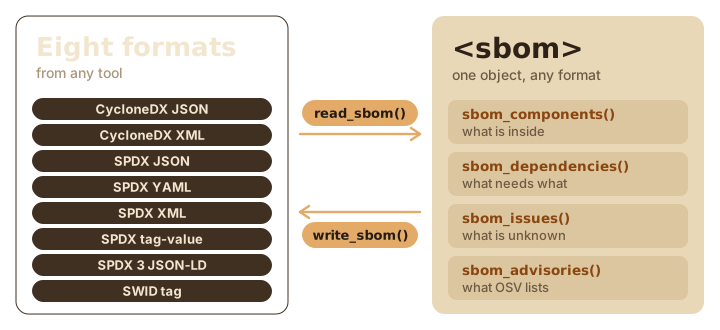
write_sbom(x, out, format = "all")Writing an SBOM is half the job. The other half arrives in your inbox: a vendor’s SBOM to review, a colleague’s build to compare with yours, or your own file that a customer’s portal has just rejected. sbom reads all eight formats it writes, from any tool, and checks them without the network.
Read any SBOM
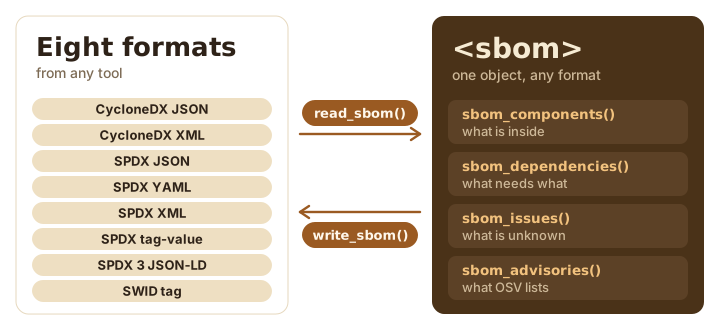
read_sbom() turns a file back into an <sbom>, which you can print, summarize, compare or write again in another format. It detects the format from the content, not the name, which helps with files called sbom-final-v2.txt.
mystery <- file.path(tempdir(), "sbom-final-v2.txt")
file.copy(file.path(out, "sbom-0.1.0.spdx"), mystery)
#> [1] TRUE
y <- read_sbom(mystery)
y
#> <sbom> sbom 0.1.0
#> Components: 19
#> Relationships: 28
#> Issues: 0
#> Advisories: not requested.
y$metadata$notes[1]
#> [1] "Read from sbom-final-v2.txt (SPDX tag-value 2.3)."
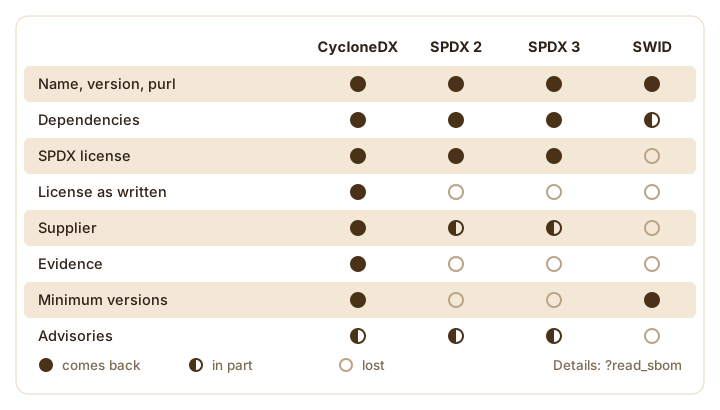
Read a file and write it back in the same format, and what the file held comes back: the same components, versions, licenses, package URLs, suppliers and dependencies, so sbom_diff() finds no differences. The new file differs from the old one only in details. read_sbom() adds a note naming the file it read, so the serial number, which derives from the content, changes too. sbom builds some ids from its own ecosystem labels, such as local and base-r, which no format stores, so those ids change. And the DESCRIPTION dependency fields that CycloneDX carries as properties are not read back.
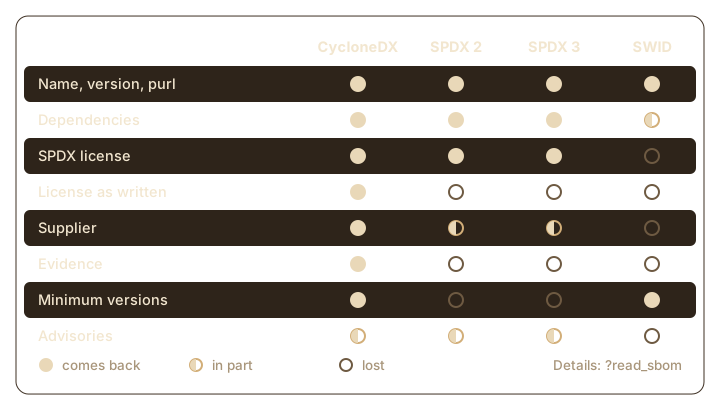
Writing to a different format loses whatever that format has no field for. SPDX has no field for R’s License field as written, and a SWID tag keeps little beyond names, versions and purls for anything but its root. The Details of ?read_sbom list every value each format loses.
Files from other tools read the same way. One of sbom’s examples is a small CycloneDX file of the kind a Python tool might write:
other <- sbom_example("dashboard.cdx.json")
writeLines(readLines(other))
#> {
#>   "bomFormat": "CycloneDX", "specVersion": "1.5", "version": 1,
#>   "serialNumber": "urn:uuid:3e671687-395b-41f5-a30f-a58921a69b79",
#>   "metadata": {
#>     "timestamp": "2026-03-01T09:00:00Z",
#>     "tools": [{"vendor": "Example", "name": "py-sbom-maker", "version": "2.1"}],
#>     "component": {"bom-ref": "app", "type": "application", "name": "dashboard",
#>                   "version": "1.4.0"}
#>   },
#>   "components": [
#>     {"bom-ref": "requests", "type": "library", "name": "requests", "version": "2.32.3",
#>      "purl": "pkg:pypi/requests@2.32.3", "licenses": [{"license": {"id": "Apache-2.0"}}]},
#>     {"bom-ref": "urllib3", "type": "library", "name": "urllib3", "version": "2.2.2",
#>      "purl": "pkg:pypi/urllib3@2.2.2", "licenses": [{"expression": "MIT"}]}
#>   ],
#>   "dependencies": [
#>     {"ref": "app", "dependsOn": ["requests"]},
#>     {"ref": "requests", "dependsOn": ["urllib3"]}
#>   ]
#> }
d <- read_sbom(other)
sbom_tree(d)
#> dashboard 1.4.0
#> └─requests 2.32.3
#>   └─urllib3 2.2.2
knitr::kable(sbom_components(d)[, c("name", "version", "ecosystem", "license_spdx", "purl")])| name | version | ecosystem | license_spdx | purl |
|---|---|---|---|---|
| dashboard | 1.4.0 | unknown | NA | NA |
| requests | 2.32.3 | pypi | Apache-2.0 | pkg:pypi/requests@2.32.3 |
| urllib3 | 2.2.2 | pypi | MIT | pkg:pypi/urllib3@2.2.2 |
Anything sbom could not read, such as relationships of a type it does not model or elements that share an id, becomes an issue on the result, in the same sbom_issues() table as for an SBOM sbom built. Reading SPDX YAML needs the yaml package.
Validate a file
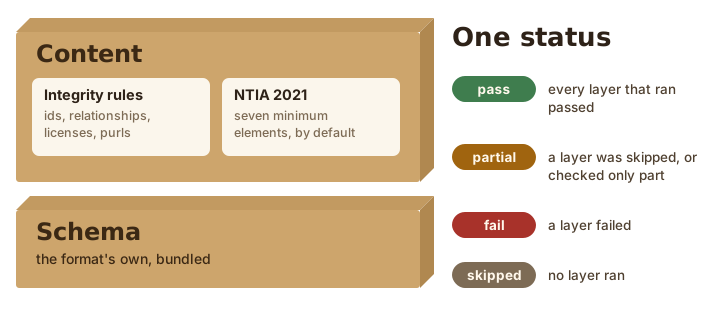
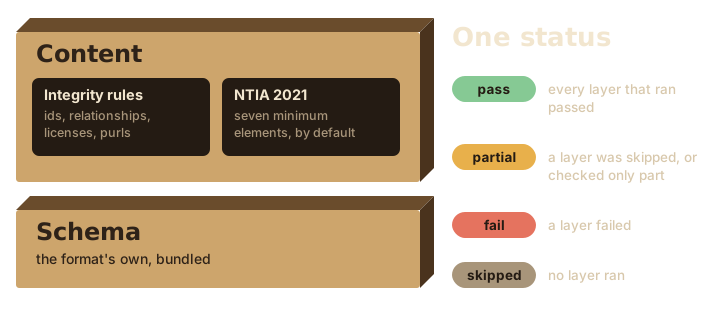
validate_sbom() runs two layers of checks. The schema layer checks the file against the schema of its format and version. sbom bundles the schemas, so this works offline:
| Format | Checked against |
|---|---|
| CycloneDX | the bundled schema of its format |
| SPDX 2 in JSON or YAML | the bundled schema of its format |
| SPDX 2 in XML or tag-value | converted to the SPDX JSON model and checked against the JSON schema |
| SPDX 3 | its JSON schema, without its Shapes Constraint Language rules |
| SWID | structural rules or, when you supply it, the standard’s official schema |
The SPDX 2.2 and 2.3 specifications publish a schema for JSON only. They have no XML schema and no grammar for tag-value, and they describe their XML format as still in development. So sbom converts XML and tag-value documents to the JSON model, whose schema the specification does publish. SPDX’s own validator, tools-java (behind tools.spdx.org), also reads every format into one model and checks it there, with a schema step for JSON only.
The JSON schemas need the jsonvalidate package; without it that layer is skipped and says so. The content layer then checks every document against integrity rules (unique ids, relationships that name elements the document defines, license expressions on the SPDX License List, purls that parse, and valid names and versions for R packages) and, under the default profile, the minimum elements of the NTIA’s 2021 report: supplier, name, version, identifier, relationships, author and timestamp.
Here is the Python tool’s file:
v <- validate_sbom(other)
v
#> CycloneDX JSON 1.5, dashboard.cdx.json: FAIL
#> Profile: ntia-2021.
#>
#> ── Errors ──
#>
#> ✖ dashboard 1.4.0 has no purl, CPE or SWID identifier. (/metadata/component)
#>   ℹ Give each component a purl, CPE or SWID tag id; if sbom made this SBOM,
#>     assert a purl it cannot find with an override of purl.
#> ✖ ntia-supplier: 3 findings
#>   • requests 2.32.3 has no supplier. (/components/0)
#>   • urllib3 2.2.2 has no supplier. (/components/1)
#>   • dashboard 1.4.0 has no supplier. (/metadata/component)
#>   ℹ State each component's supplier; if sbom made this SBOM, assert the ones it
#>     cannot find with an override of supplier_name.
#>
#> ── Warnings ──
#>
#> ! The document names only a tool (py-sbom-maker) as its author; NTIA asks for
#>   the person or organization that made the SBOM data. (/metadata/tools/0)
#>   ℹ Name the person or organization that made the SBOM data as its author; if
#>     sbom made this SBOM, give its author or organization argument.
The errors are all about completeness: no supplier anywhere, no identifier for the application, and only a tool where a person or organization should be named as author. as.data.frame() gives the findings as a table, ready for a review log:
knitr::kable(as.data.frame(v))| check | severity | location | message |
|---|---|---|---|
| ntia-identifier | error | /metadata/component | dashboard 1.4.0 has no purl, CPE or SWID identifier. |
| ntia-supplier | error | /components/0 | requests 2.32.3 has no supplier. |
| ntia-supplier | error | /components/1 | urllib3 2.2.2 has no supplier. |
| ntia-supplier | error | /metadata/component | dashboard 1.4.0 has no supplier. |
| ntia-author | warning | /metadata/tools/0 | The document names only a tool (py-sbom-maker) as its author; NTIA asks for the person or organization that made the SBOM data. |
profile = "none" keeps the integrity rules and drops NTIA, which is the question “is this file well formed?” without “is it complete?”:
validate_sbom(other, profile = "none")$status
#> [1] "pass"
Check {sbom}’s own files
Each format gets the strongest check it can. Statuses are pass, fail, partial (a layer could check only part of the rules, or was skipped) and skipped.
files <- list.files(out, full.names = TRUE)
# SPDX YAML can only be read with the yaml package.
if (!requireNamespace("yaml", quietly = TRUE)) files <- files[!endsWith(files, ".yaml")]
status <- vapply(files, function(f) validate_sbom(f, profile = "none")$status, "")
knitr::kable(data.frame(file = basename(files), status = unname(status)))| file | status |
|---|---|
| sbom-0.1.0.cdx.json | pass |
| sbom-0.1.0.cdx.xml | pass |
| sbom-0.1.0.spdx | partial |
| sbom-0.1.0.spdx.json | pass |
| sbom-0.1.0.spdx.xml | partial |
| sbom-0.1.0.spdx.yaml | pass |
| sbom-0.1.0.spdx3.jsonld | partial |
| sbom-0.1.0.swidtag | partial |
SPDX XML and tag-value have no official schema, SPDX 3’s SHACL rules are not checked, and SWID tags get sbom’s structural rules, so those are partial at best. Without jsonvalidate, the JSON formats are partial too.
With the NTIA profile switched back on, sbom’s own SBOM fails:
validate_sbom(file.path(out, "sbom-0.1.0.cdx.json"))
#> CycloneDX JSON 1.6, sbom-0.1.0.cdx.json: FAIL
#> Profile: ntia-2021.
#>
#> ── Errors ──
#>
#> ✖ ntia-identifier: 4 findings
#>   • R 4.6.2 has no purl, CPE or SWID identifier. (/components/0)
#>   • methods 4.6.2 has no purl, CPE or SWID identifier.
#>     (/components/0/components/0)
#>   • utils 4.6.2 has no purl, CPE or SWID identifier.
#>     (/components/0/components/1)
#>   … and 1 more.
#>   ℹ Give each component a purl, CPE or SWID tag id; if sbom made this SBOM,
#>     assert a purl it cannot find with an override of purl.
#> ✖ ntia-supplier: 3 findings
#>   • R 4.6.2 has no supplier. (/components/0)
#>   • methods 4.6.2 has no supplier. (/components/0/components/0)
#>   • utils 4.6.2 has no supplier. (/components/0/components/1)
#>   ℹ State each component's supplier; if sbom made this SBOM, assert the ones it
#>     cannot find with an override of supplier_name.
#>
#> ── Warnings ──
#>
#> ! The document names only a tool (sbom) as its author; NTIA asks for the person
#>   or organization that made the SBOM data. (/metadata/tools/components/0)
#>   ℹ Name the person or organization that made the SBOM data as its author; if
#>     sbom made this SBOM, give its author or organization argument.
#>
#> Use as.data.frame() to see every finding.
That is deliberate. sbom does not invent a package URL or a supplier for R and its base packages, so they stay missing until someone who knows asserts them. The compliance guide shows how.
Check a SWID tag
sbom does not bundle the ISO/IEC 19770-2:2015 schema of SWID tags, since ISO’s notice does not clearly allow it to be redistributed. A tag is checked against sbom’s structural rules instead, which are no stricter than the ISO schema, and the result says so:
validate_sbom(file.path(out, "sbom-0.1.0.swidtag"))
#> SWID tag 2015, sbom-0.1.0.swidtag: FAIL
#> Profile: ntia-2021.
#>
#> ── Errors ──
#>
#> ✖ A SWID tag has no field for the time it was made, so it has no timestamp.
#>   ℹ Record when the SBOM was made, in a format that has a field for it.
#>
#> ── Warnings ──
#>
#> ! The document names only a tool (sbom) as its author; NTIA asks for the person
#>   or organization that made the SBOM data. (/entities/0)
#>   ℹ Name the person or organization that made the SBOM data as its author; if
#>     sbom made this SBOM, give its author or organization argument.
#>
#> ── Notes ──
#>
#> ℹ sbom does not bundle the ISO/IEC 19770-2:2015 schema, so the tag was checked
#>   against sbom's structural rules; set the option sbom.swid_xsd to a copy of
#>   the ISO schema to check it fully.
#> ℹ A SWID tag describes only itself, so the 18 tags it links to were not
#>   checked. (/links)
#>   ℹ Check the linked tags on their own, or use a format that lists every
#>     component.
To check a tag fully, download the schema from https://standards.iso.org/iso/19770/-2/2015-current/schema.xsd and point the sbom.swid_xsd option at it. sbom accepts only that file, recognized by its SHA-256, and needs no network for the check.
old <- options(sbom.swid_xsd = "path/to/schema.xsd")
validate_sbom("sbom-0.1.0.swidtag")
options(old)
A SWID tag has no field for the time it was made, so under the NTIA profile it always fails ntia-timestamp. Use it alongside another format, not instead.
Stop a script on failure
error_on turns findings into an R error, for continuous integration:
res <- tryCatch(
  validate_sbom(other, error_on = "error"),
  sbom_validation_error = function(e) e
)
class(res)
#> [1] "sbom_validation_error" "rlang_error"           "error"
#> [4] "condition"
nrow(as.data.frame(res$validation))
#> [1] 5
Compare two SBOMs
sbom_diff() lists what was added or removed between two SBOMs, and what changed version, license or source. The examples report-before and report-after hold a project’s lockfile before and after an update:
before <- sbom_renv(file.path(sbom_example("report-before"), "renv.lock"),
  system = FALSE, timestamp = ts)
after <- sbom_renv(file.path(sbom_example("report-after"), "renv.lock"),
  system = FALSE, timestamp = ts)
sbom_diff(before, after)
#> 1 added, 1 removed, 2 changed
#> ~ cli (version): 3.6.4 -> 3.6.5
#> + glue 1.8.0
#> - jsonlite 1.8.9
#> ~ notarealpkg (license): GPL-2.0-only -> GPL-3.0-only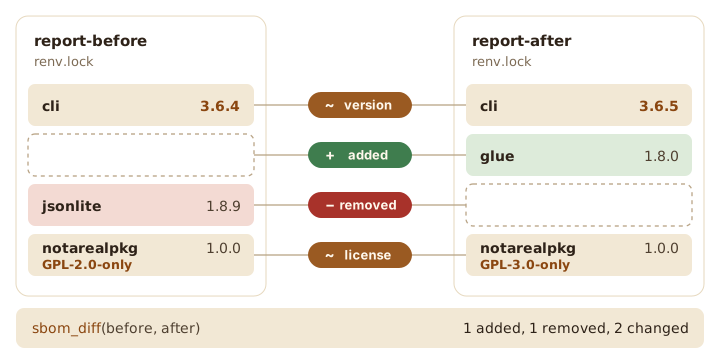
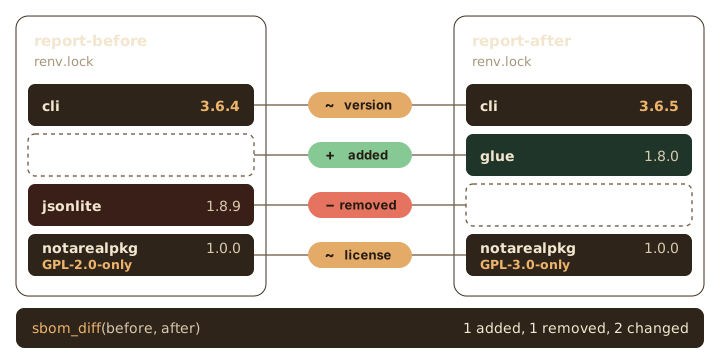
{notarealpkg} kept its version number but changed its license, which is exactly the kind of thing nobody reads release notes closely enough to catch. as.data.frame() returns the changes as a data frame.
The two SBOMs need not share a format. Each format keeps a different part of what sbom knows (SPDX, for one, has no field for R’s license as written), so sbom_diff() compares only what both of them state. An SBOM against its own SPDX copy is a fair fight:
spdx <- file.path(tempdir(), "after.spdx.json")
write_sbom(after, spdx)
sbom_diff(after, read_sbom(spdx))
#> No differences.