library(sbom)
ts <- as.POSIXct("2026-01-01", tz = "UTC")
sbom_example()
#>  [1] "PACKAGES"               "analysis"               "analysis-manifest.json"
#>  [4] "connect-app"            "dashboard.cdx.json"     "library"
#>  [7] "nix-project"            "osv-all.zip"            "report-after"
#> [10] "report-before"          "shiny-app"              "study"
#> [13] "study-overrides.csv"Most R code that ends up in front of an auditor is not a package. It is an analysis, a report or a Shiny app, and what it depends on is written down, if at all, in an renv lockfile, a Posit Connect manifest, a Nix file or nowhere but the code. This guide shows what sbom makes of each, using the small examples that come with it. sbom_example() lists them and returns their paths.
Start from a project folder
The analysis example is a script and an renv lockfile. The script uses three packages; the lockfile, as lockfiles sometimes do, remembers only two. copy = TRUE copies the example into a temporary folder, so that this guide can add a file to it later.
proj <- sbom_example("analysis", copy = TRUE)
list.files(proj)
#> [1] "analysis.R" "renv.lock"
writeLines(readLines(file.path(proj, "analysis.R")))
#> library(cli)
#> x <- jsonlite::fromJSON('[1, 2, 3]')
#> doc <- xml2::read_xml('<a/>')
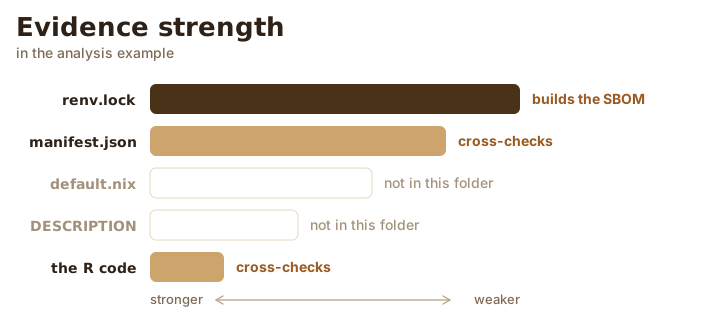
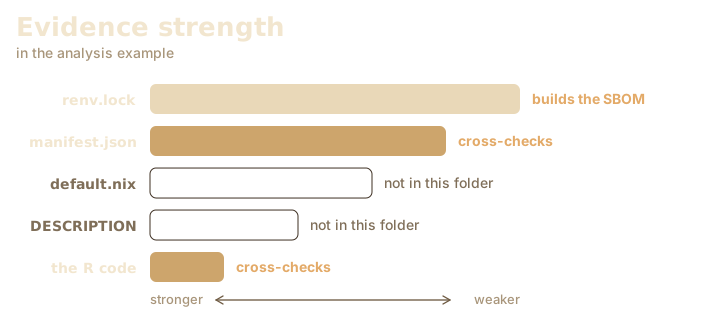
sbom() looks at what the folder holds and builds the SBOM from the strongest source it finds: renv.lock, then a Posit Connect manifest.json, then a default.nix, then a package DESCRIPTION, and last a scan of the R code. Every other source present is read to check the first, and each disagreement becomes an issue.
x <- sbom(proj, system = FALSE, timestamp = ts)
sbom_tree(x)
#> analysis
#> ├─cli 3.6.5
#> │ ├─R 4.5.1
#> │ │ ├─methods 4.5.1
#> │ │ └─utils 4.5.1
#> │ └─utils 4.5.1 (see above)
#> └─jsonlite 2.0.0
#>   └─methods 4.5.1 (see above)
knitr::kable(sbom_issues(x)[, c("severity", "code", "message")])| severity | code | message |
|---|---|---|
| warning | version-missing | The project folder analysis is not a git repository, so it has no version. |
| info | no-sbom-author | No author or organization was given for this SBOM, so only the tool that made it is recorded. |
| info | drift-not-checked | No project library was found, so the installed packages were not compared with renv.lock. |
| warning | drift-extra | xml2 is in the code but not in renv.lock. |
The code scan caught xml2, which the lockfile forgot. The SBOM lists only what renv.lock pins, the stronger evidence, with the gap on record. Outside git the project has no version; inside a repository it is the current commit, read from .git without running git. The metadata lists every source read:
x$metadata$inputs$kind
#> [1] "renv.lock" "code"      "library"   "library"   "library"
Read an {renv} lockfile
sbom_renv() reads a lockfile directly. Give it a library and it compares what is installed there with what is locked. A library is only a folder of package folders with DESCRIPTION files, which is all sbom reads, so the library example, which holds cli 3.6.6, makes the point:
lib <- sbom_example("library")
y <- sbom_renv(file.path(proj, "renv.lock"), library = lib, system = FALSE, timestamp = ts)
knitr::kable(sbom_issues(y)[, c("code", "message")])| code | message |
|---|---|
| version-missing | The project folder analysis is not a git repository, so it has no version. |
| no-sbom-author | No author or organization was given for this SBOM, so only the tool that made it is recorded. |
| drift-version | cli is 3.6.5 in renv.lock but 3.6.6 in the library. |
| drift-missing | jsonlite 2.0.0 is in renv.lock but not in the library. |
Those drift- issues are the ones summary() gathers under “Drift”. The SBOM keeps the locked versions; the drift tells you the machine has wandered.
Read a Posit Connect manifest
rsconnect::writeManifest() leaves a manifest.json that pins the packages of deployed content. sbom_rsconnect() reads it, and lists each deployed file as a component with the MD5 checksum the manifest records. Here the analysis gets the manifest of its deployment, which pins a newer cli:
invisible(file.copy(sbom_example("analysis-manifest.json"), file.path(proj, "manifest.json")))
m <- sbom_rsconnect(file.path(proj, "manifest.json"), system = FALSE, timestamp = ts)
sbom_tree(m)
#> analysis
#> ├─analysis.R
#> └─cli 3.6.6
#>   ├─R 4.5.1
#>   │ └─utils 4.5.1
#>   └─utils 4.5.1 (see above)
With both files in one folder, sbom() still builds from the lockfile and now reports where the deployment and the lockfile part ways:
x <- sbom(proj, system = FALSE, timestamp = ts)
sbom_issues(x)$message[startsWith(sbom_issues(x)$code, "drift-")]
#> [1] "No project library was found, so the installed packages were not compared with renv.lock."
#> [2] "cli is 3.6.5 in renv.lock but 3.6.6 in manifest.json."
#> [3] "jsonlite 2.0.0 is in renv.lock but not in manifest.json."
#> [4] "xml2 is in the code but not in renv.lock."
Describe a Shiny app
A Shiny app is described as an application, with the R packages it needs and the JavaScript and CSS it ships in its static folder. sbom() recognizes rhino, golem, app.R and ui.R with server.R layouts and hands them to sbom_shiny(), which you can also call yourself.
app <- sbom_example("shiny-app")
list.files(app, recursive = TRUE)
#> [1] "app.R"                   "www/jquery-3.7.1.min.js"
writeLines(readLines(file.path(app, "app.R")))
#> library(shiny)
#> ui <- fluidPage(tags$script(src = 'jquery-3.7.1.min.js'))
#> shinyApp(ui, function(input, output) {})
s <- sbom_shiny(app, lib = character(), system = FALSE, timestamp = ts)
sbom_tree(s)
#> shiny-app
#> ├─jquery 3.7.1 (embedded)
#> └─shiny
jQuery was recognized by its file name and dated by its header comment. A file that matches none of sbom’s rules is left out of the SBOM. lib = character() hands the code scan an empty library, so this page does not depend on whether you have shiny installed: it shows up with an unknown version and an issue. Leave lib alone in real use.
By default no app code runs. evaluate_ui = TRUE runs it (the whole of app.R, or ui.R) in a separate R process, stopped after 60 seconds, to find the HTML dependencies the UI holds. It needs htmltools, and misses anything that renderUI() or other server code adds later.
sbom_shiny(app, evaluate_ui = TRUE)Read a Nix file written by {rix}
sbom_nix() reads a default.nix written by the rix package. Without Nix, or with nix = FALSE, it reads the file as text and runs nothing:
nixproj <- sbom_example("nix-project")
writeLines(readLines(file.path(nixproj, "default.nix")))
#> # This file was generated by the {rix} R package v0.18.6 on 2026-11-05
#> # >rix(r_ver = "4.4.1")
#> let
#>  pkgs = import (fetchTarball "https://github.com/rstats-on-nix/nixpkgs/archive/2024-10-01.tar.gz") {};
#>  rpkgs = builtins.attrValues { inherit (pkgs.rPackages) cli jsonlite; };
#>  system_packages = builtins.attrValues { inherit (pkgs) R glibcLocales; };
#> in pkgs.mkShell { buildInputs = [ rpkgs system_packages ]; }
n <- sbom_nix(file.path(nixproj, "default.nix"), nix = FALSE, system = FALSE, timestamp = ts)
sbom_tree(n)
#> nix-project
#> ├─cli
#> ├─glibcLocales
#> └─jsonlite
The file names packages but not their versions; those live in the nixpkgs snapshot it pins. An issue says so. snapshot looks them up in a CRAN PACKAGES file: a local path, a URL, or "ppm" for the Posit Package Manager snapshot of the pinned date. A local file needs no network, and the examples include one for this default.nix:
packages <- sbom_example("PACKAGES")
writeLines(readLines(packages))
#> Package: cli
#> Version: 3.6.3
#>
#> Package: jsonlite
#> Version: 1.8.9
n <- sbom_nix(file.path(nixproj, "default.nix"), nix = FALSE, system = FALSE,
  timestamp = ts, snapshot = packages)
sbom_tree(n)
#> nix-project
#> ├─cli 3.6.3
#> ├─glibcLocales
#> └─jsonlite 1.8.9
# Downloads the CRAN snapshot for 2024-10-01 from Posit Package Manager.
sbom_nix("default.nix", nix = FALSE, snapshot = "ppm")
With Nix installed, sbom_nix() reads the built environment from the Nix store instead, with real versions and the system libraries. Nix mode is experimental: it is built on the output formats documented for Nix 2.18 and later, and tested against recorded output rather than a Nix installation. It runs nix-instantiate, which may download nixpkgs. Build the environment with nix-shell or nix-build first, or sbom falls back to reading the file and says so.
Describe a whole library
sbom_installed() describes the packages in a library, or a chosen few and their dependencies. On the example library from earlier:
sbom_tree(sbom_installed(lib = lib, system = FALSE, timestamp = ts))
#> R library
#> └─cli 3.6.6
#>   ├─R (>= 3.4)
#>   │ └─utils
#>   └─utils (see above)
R appears as R (>= 3.4) because sbom cannot tell which R a library other than the current search path serves. It records the highest minimum the packages state, with version_is set to "minimum" in sbom_components(). With no arguments, sbom_installed() lists every package in .libPaths(): thorough, and on a well-stocked machine, long.
Find system libraries
R packages lean on the operating system: xml2 needs libxml2, curl needs libcurl. With system = TRUE, the default everywhere, sbom records two kinds of evidence. It maps each package’s SystemRequirements to system libraries with pak’s rules, when pak is installed, using the rules pak has on disk with their update turned off. And for installed packages with compiled code, it reads which shared libraries the binary links, with otool on macOS or ldd on Linux, and asks dpkg or rpm which system package owns each one.
z <- sbom_installed("xml2")
sbom_tree(z)
On the Mac this guide was written on, that lists libxml2 as declared and the libraries the xml2 binary links as observed, with an issue noting that xml2 declares libxml2 but does not link it dynamically, so it may carry its own copy. Results like these depend on the machine, which is why the rest of this page uses system = FALSE. A machine without otool, ldd or pak still gets an SBOM, with an issue naming what was not checked.
Control network access
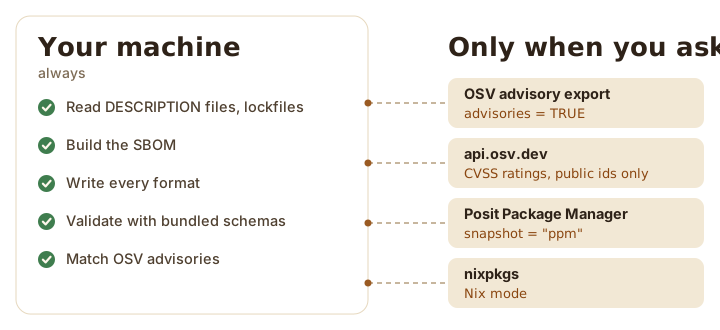
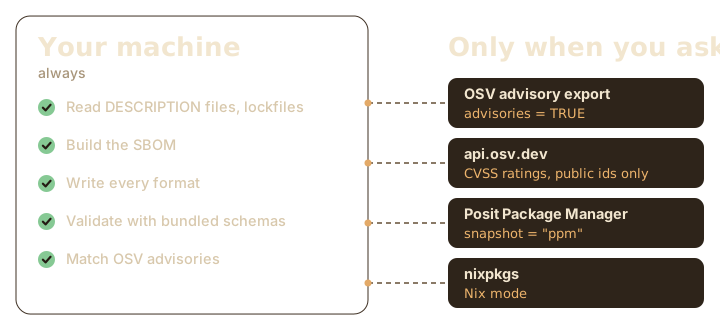
Building an SBOM is offline unless you ask otherwise. The exceptions:
-
advisories = TRUEdownloads OSV’s advisory data (see the compliance guide). -
snapshotinsbom_nix(), or insbom()for a folder with adefault.nix, given as"ppm"or a URL. - Nix mode, where
nix-instantiatemay download nixpkgs. Passnix = FALSEto rule it out.
Nothing else reaches out: not pak, not the lockfile reader, not the code scan.